Coc完全指南
简介
Coc.nvim 是一个基于NodeJS 的适用于Vim8, Neovim 的Vim 智能补全插件。拥有完整的LSP 支持。配置、使用方式及插件系统的整体风格类似 VSCode.更多的信息可以参见Wiki.
注意:因为Coc 本身是Vim 的一个插件而已,但它又有自己的插件系统,所以下面我会将Coc 的插件叫做子插件以作区分。
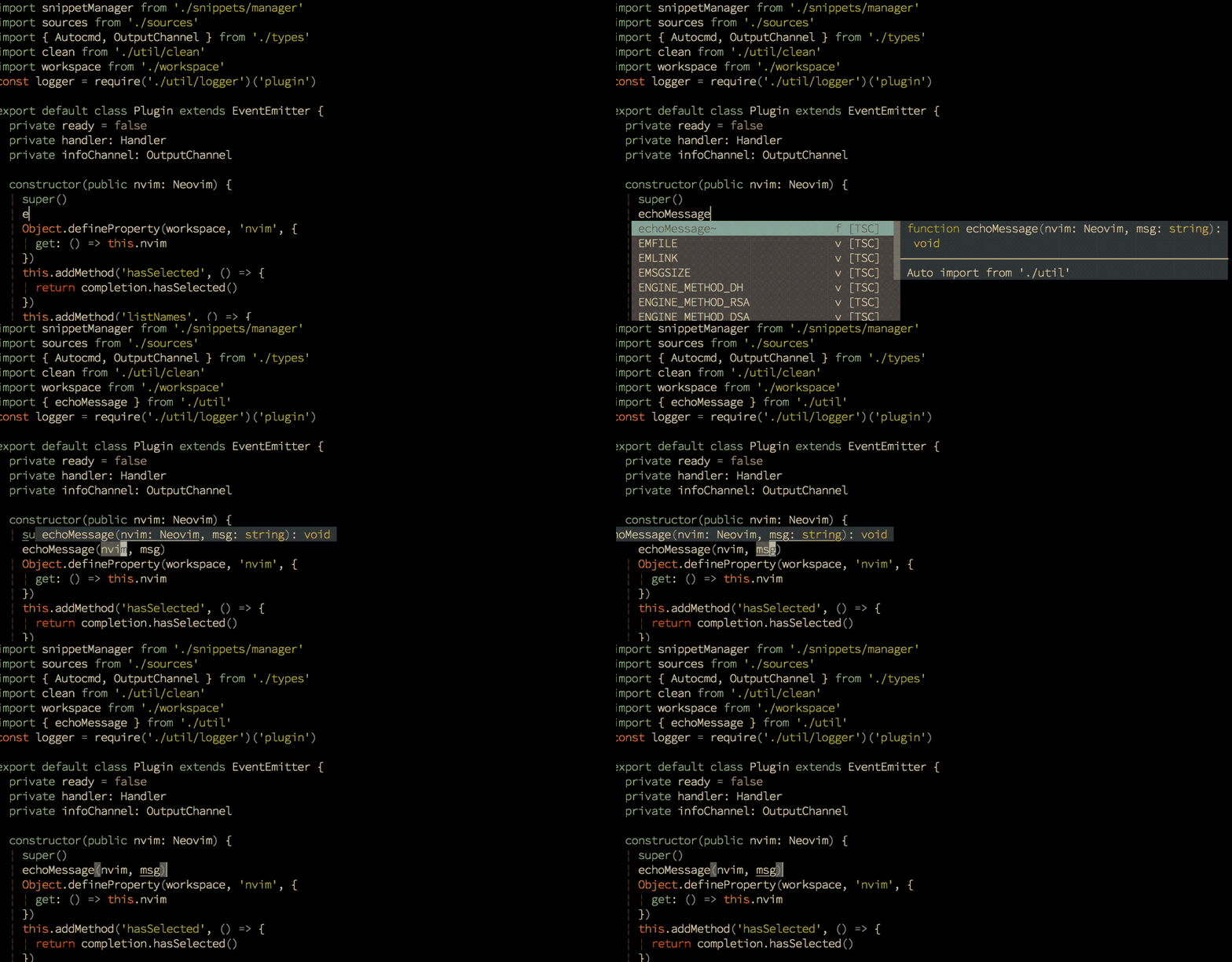
Coc.nvim 是一个基于NodeJS 的适用于Vim8, Neovim 的Vim 智能补全插件。拥有完整的LSP 支持。配置、使用方式及插件系统的整体风格类似 VSCode.更多的信息可以参见Wiki.
注意:因为Coc 本身是Vim 的一个插件而已,但它又有自己的插件系统,所以下面我会将Coc 的插件叫做子插件以作区分。
SkCode 是根据 NvChad(它是一个优秀且支持拓展的 nvim lua 配置)"抄袭"而来, 你可以理解成 SkCode 它的代码都来源于这个仓库. SkCode 的代码结构是来源于 NvChad, 但是 SkCode 也绝不是简简单单的抄代码, 我希望 vim 的配置更加简单, 所以将一些代码进行优化, 删除不需要的功能, 添加人性化的键位绑定, 以及提供前端的 Lsp 配置, 于是就出现了 SkCode.
/etc/fstab是用来存放文件系统的静态信息的文件。位于/etc/目录下,可以用命令less /etc/fstab
来查看,如果要修改的话,则用命令 vi /etc/fstab 来修改。
当系统启动的时候,系统会自动地从这个文件读取信息,并且会自动将此文件中指定的文件系统挂载到指定的目录。下面我来介绍如何在此文件下填写信息。
一个简单的 /etc/fstab,使用内核名称标识磁盘:
1 | /etc/fstab # <file system> <dir> <type> <options> <dump> <pass> tmpfs /tmp tmpfs nodev,nosuid 0 0 /dev/sda1 / ext4 defaults,noatime 0 1 /dev/sda2 none swap defaults 0 0 /dev/sda3 /home ext4 defaults,noatime 0 2 |
1 | -v :显示更多的 PCI 接口装置的详细信息 |
1 | lspci -v |
1 | lspci -s 04:00.0 -vv |
1 | -vv |
编者注:本文译自微软官方发布的指南。
Linux 是一款操作系统,与 Windows 有许多相似之处,但由于其开源和高度定制化的特性,衍生出众多的版本。安装 Linux 的前提是,你需要决定一个安装方式,并选定一个适合的 Linux 发行版。
要安装 Linux,你需要如下步骤:
本文翻译自 GIMP 官网,是 GIMP 教程的一部分。
exe文件安装1 | sudo pacman -S gimp |
1 | sudo apt-get install gimp |
恭喜你!你在电脑上安装了 GIMP!GIMP 是一个非常强大的图像处理软件,但是不要被它吓到。即使你没有时间学习高级的电脑图形处理技能,GIMP 仍然可以是一个非常有用和方便的快速修改图像的工具。
我希望这些例子能帮助你解决那些需要对图像应用进行快速修改的小需求。希望这也能让你学习到 GIMP 更强大的图像编辑能力。
为了便于快速查看,我将在这篇快速教程中涵盖以下四个要点:
U盘启动,如何在BIOS设置U盘为第一启动项呢?BIOS设置有两种方式,一种是利用快捷键设置U盘启动,而另一种则是针对没有快捷键可利用的电脑使用的,接下来小编就为大家详细介绍一下U盘启动BIOS设置的两种方式吧。
方式一
制作一个U盘启动盘
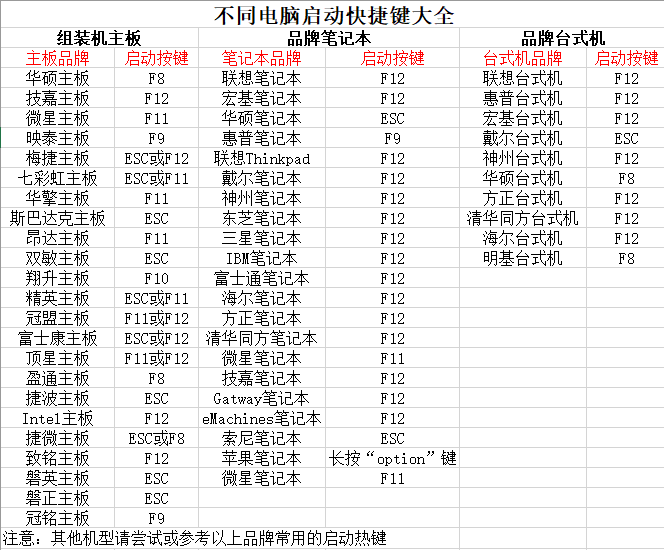
找到自己电脑型号所对应的BIOS快捷键,可参考下图显示的BIOS启动快捷键,如若没有可自行查询
方式二
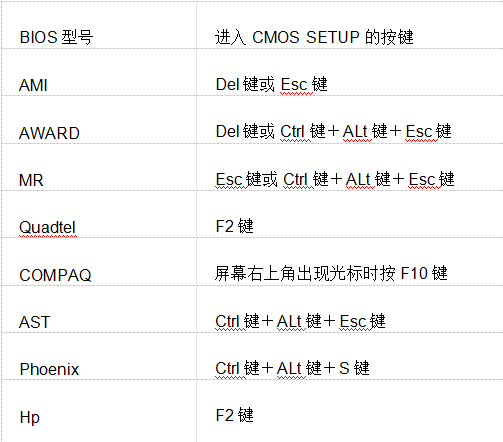
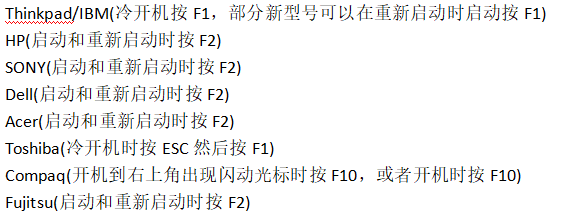
笔记本方面,不同笔记本进入BIOS方式不一样,一般都是由主板决定的,某些特殊主板请看下图:
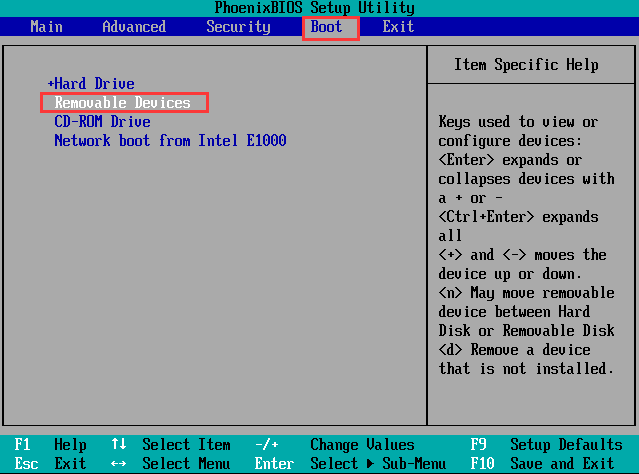
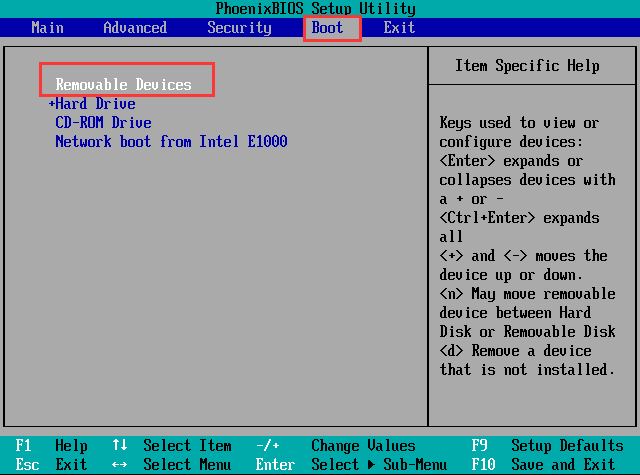
ImageMagick 是一套开源图形处理工具,其中用的最多的命令就是 convert。之前,薄荷君介绍了《图像魔术:ImageMagick轻松转换PDF和图片》的用法,今天要介绍的是它拼接图片的用法。
LinuxMint 自带了 ImageMagick。如果是其他发行版,请先安装之:
sudo apt install imagemagick

首先学习一下图片的横向拼接,举例如下:(01.jpg 和 02.jpg
是原文件,11.jpg 是拼接后的文件)
convert 01.jpg 02.jpg +append 11.jpg

查看拼接后的图片,非常完美。

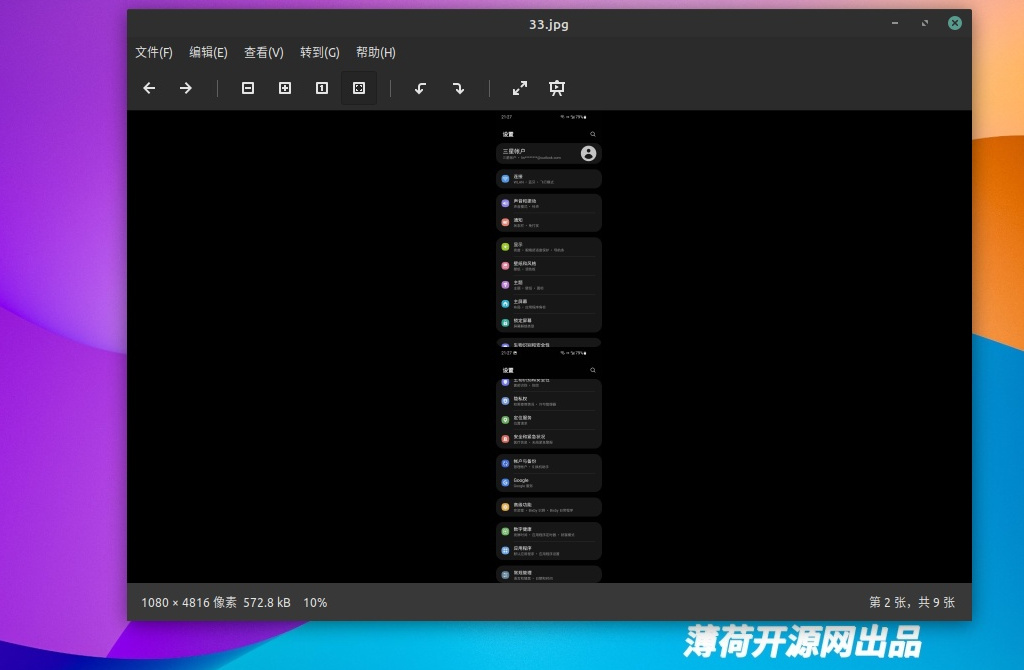
现在学习一下图片的纵向拼接,举例如下:(03.jpg 和 04.jpg
是原文件,33.jpg 是拼接后的文件)
convert 03.jpg 04.jpg -append 33.jpg

是的,你没有看错,横向与纵向的区别就是 + 和 – 。
看看纵向拼接的图片,Perfect。
小结:ImageMagick 是一套非常小巧但强大、实用的开源图形处理工具,更多用法,等你来探索!
Linux 下的下载工具算是很丰富的了,目前主流的有 FDM、Motrix、迅雷、uGet 等等。但是今天的主角 Motrix 算是比较全能的一位了。
Motrix 除了支持常规的 http 下载,还支持
BT、磁力甚至迅雷链接。当然,ed2k 电驴链接暂不支持。Motrix
的外观走小清新风格,简洁明快,点缀配色恰到好处,选项设置简单明了。
Motrix 官网:https://motrix.app

Motrix 提供了 deb 安装包和 Appimage 包,对新手用户非常友好,各个主流 Linux 发行版都可以使用。
安装后,启动
Motrix,真的是没有任何多余的按钮和功能,简洁实用,上手使用没有任何难度。看上去也非常舒服。

添加一个 BT 下载任务进行测试。当然也可以同时添加多个任务。

在种子资源足够的情况下,Motrix 下载基本上能达到满速,非常不错。

添加一个迅雷链接进行测试。可能会提示资源不一定存在,不管它,先下载试试看。

Motrix
下载一些热门迅雷资源还是没问题,速度也不错。但是毕竟不是原生迅雷,在部分资源解析方面,尤其是对于冷门资源,Motrix
还是容易下载失败。不过也没关系,现在迅雷链接已经不复当年盛况,主流的 BT
和磁力就够用了。

进入 Motrix
的设置页面,在基础设置里,就是一些外观界面、保存路径、限速、任务数量、消息通知等设置,一看就会。


在进阶设置页面,值得称赞的是,Motrix 默认添加了 Tracker
服务器,不必像 Qbittorrent
那样手动添加了。而且 Motrix 的 Tracker
服务器列表还是每天自动更新。对于BT和磁力下载而言,真是太有帮助了。

特别值得一提的是,Motrix
可以设置模拟用户代理,直接点击下方的客户端即可,其中 du
是指百度网盘,对于使用 x 猴脚本的用户而言,这个可是非常有用。

小结:相较于 FDM,Motrix 功能更为全面,界面也更好看,一些黑科技功能也更好用。当然,Motrix 能提供各大浏览器扩展就更完美了。
局域网文件传送,主要用于手机与电脑或者手机与手机之间,对于 Linux 用户而言,站长薄荷君之前推荐过 LANDrop、Dukto、Feem 等。随着时过境迁,很多优秀的开源项目都没有维护了,目前能够良好支持手机与电脑(Linux)的局域网文件传送工具中,Feem 算是不错的了。当然,美中不足是有广告。
现在,LocalSend 来了!
顾名思义,LocalSend 就是本地传送工具。这是一款开源软件,可以良好支持 Linux、MacOS 和 Windows 电脑平台,也良好支持 Android 和 iOS 移动平台。而且,LocalSend 的界面非常简洁清新,颇有原生 Android 系统的风格。关键是没有广告!
更贴心的是,LocalSend 为 Linux 用户提供了 Deb 安装包和 Appimage
包,主流 Linux 发行版都可以无忧使用,真是太棒了!
LocalSend 官网:https://localsend.org/

启动
LocalSend,接收、发送、设置,三大功能,没有任何多余的元素,而且中文化非常好。

在发送页面,就可以看到在同一局域网内运行 LocalSend 的其他设备。

薄荷君实测,通过 iPhone
向电脑(Linux)发送文件,如图所示,这是电脑端提示接收的界面。当然还可以设置成自动接收。

这是传送过程以及完成的界面。

要发送文件(图片、文件夹都可以),先点击添加,添加本地文件,然后点击下方的其他设备,向其发送。

等待目标设备接收。

局域网传送,速度很快。

在看看 LocalSend 的设置选项,都是中文见面,一看就会,毫无难度。


小结:LocalSend 无论是从界面布局、外观颜值还是功能便捷性方面都是当今最好的局域网文件传送工具,强烈推荐大家使用!